Facebook Story Downloader
Download & View Stories Anonymously
Your stories
Choose an item to preview or download.
THE STORY SAVING GUIDE
How to download a Facebook story
Save a photo from your event, keep a product update or download a video you have permission to use. Preview the available story before choosing a file.
Open the story on Facebook and copy its link from the address bar or sharing menu. Paste it into the downloader, confirm your permission and review the results. Choose Download beside the photo or video you want to save.
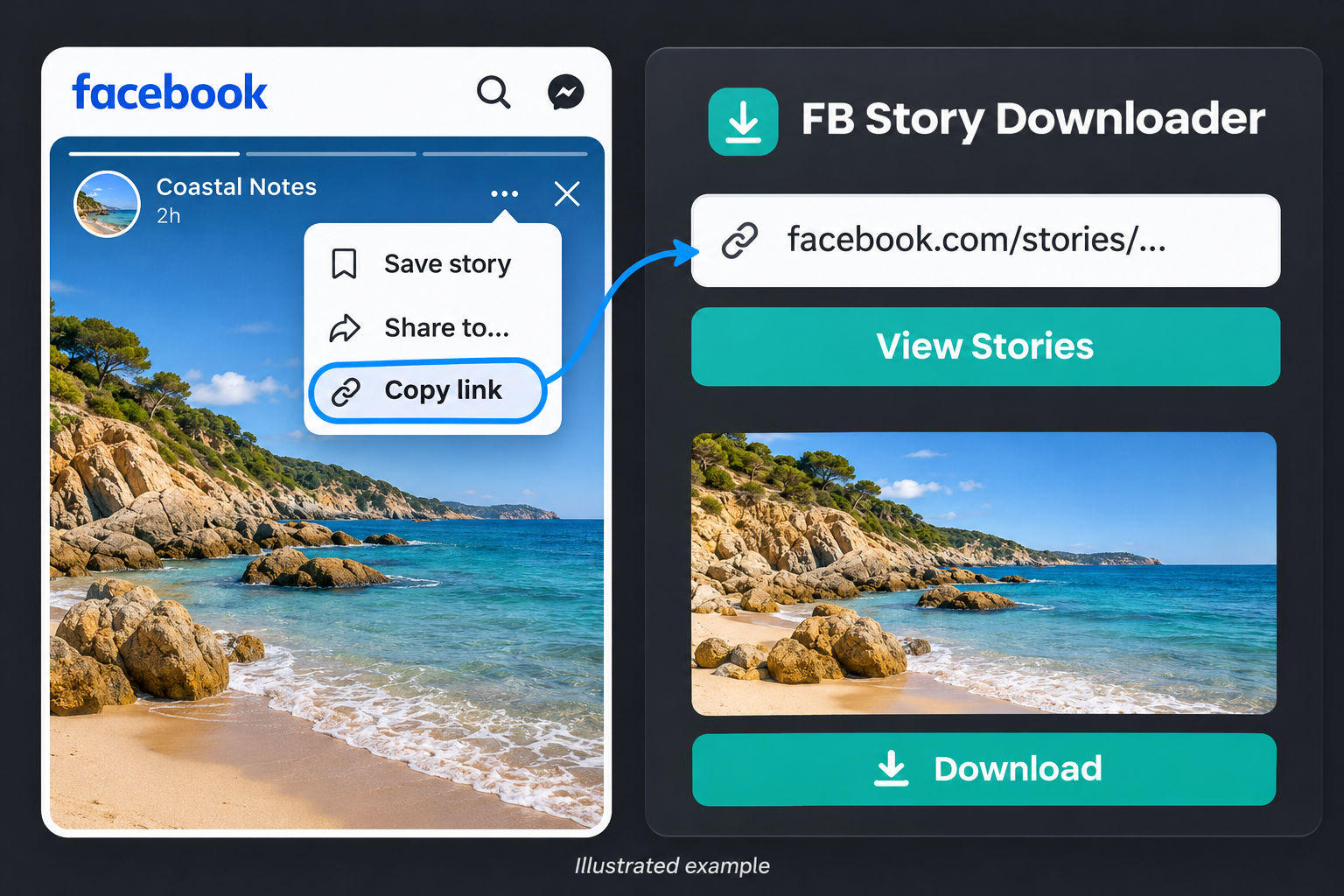
Copy. Preview. Save.
Bring the complete link
Open the story on Facebook and copy its full address. If you only have a profile link, paste that instead. Keep the address intact, including the story identifier.
Check the preview
Confirm that you own the content or have permission to download it, then start the lookup. Open each available preview to check that it is the photo or video you meant to save.
Save the item you need
Use the download button beside the chosen result. Your browser handles the file; look in Downloads or your device’s Files app if you cannot find it straight away.
What to expect from your download
Photos and videos
Available stories can contain still images or video clips. Each returned item has its own preview and download control, so you can keep one without saving the rest.
Source quality
The file depends on what Facebook makes available. A lower-resolution source stays lower resolution. This tool does not turn a small clip into 4K video or restore missing detail.
Browser-based saving
Start on a phone, tablet or computer. Download behaviour varies by browser: a file may save immediately, open in a new tab or ask you to choose a location.
If the story does not appear
A failed lookup does not always mean the link is wrong. Check these points before starting another request.
- Open the exact story on Facebook first. It may have been removed, expired or become unavailable to the service.
- Try the full story address rather than the profile URL. A direct link identifies the item more precisely.
- Leave the current lookup open. Larger videos, several stories and Facebook response times can make a request take longer.
A few questions before you save
Can I retrieve a story after it has disappeared?
This is not a story archive. If Facebook no longer provides the story, the downloader cannot recover it from an old link.
Will a profile link return every story?
Not necessarily. Only stories the service can retrieve and verify can appear. A result list should not be treated as a complete record of someone’s activity.
Can it download private or friends-only stories?
It does not unlock restricted content. A story that is unavailable to the service cannot be made accessible by pasting its link here.
Why does a saved file look different from the preview?
A preview can be scaled to fit the page. The downloaded file keeps the dimensions and format supplied by the available source; your device’s player can also affect how it looks.
Do I need to enter my Facebook password here?
No. Use the link field on this site. Do not put passwords or verification codes into it. The service is independent of Facebook and Meta.
Ready to save something of your own?
Copy the story’s address, check the preview and keep only the file you need.
Back to the downloader